

Go to New Games


Backrooms Craft
Backrooms Craft
Advertisement

FNF Serious But Everyone Sings It

Ant Flow

FNF vs Impostor Legacy

Endless Jump

FNF Mobile Mods

FNF Lagtrain

Verity Block Survival

FNF: Petrifying Plumbers
Catdoku

Friday Night Funkin VS Caine

Unbox the Room

I’m a Gummy Bear MV in FNF

FNF: feat. Bad Bunny

Toca World: Big City
FNF Funkdela Catalogue

Temple 67

FNF Rhythmic Groove

Ragdoll Duel: Sword Fight
Rating:
10 (1 votes)
Release date:
15 Oct 2026
Technology:
HTML5
Platform:
Browser (desktop, tablet, mobile)
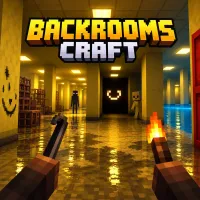
Backrooms Craft combines first-person survival horror with block-based construction inside a shifting maze of abandoned spaces. Every expedition becomes a test of preparation as you gather materials, establish a shelter, and venture deeper into increasingly dangerous territory.
Survival Gameplay
In Backrooms Craft, survival begins with scavenging abandoned furniture for basic materials. Wooden scraps provide the foundation for early equipment, while stronger tools gradually allow access to valuable resources. Crafting stations, furnaces, and salvage equipment support more advanced construction. Four survival meters demand attention: health, hunger, thirst, and sanity. Food restores hunger, almond water helps manage thirst and sanity, and bandages treat injuries.
Build a Permanent Base
The starting corridor contains a yellow boundary marking the area where your constructions remain intact between expeditions. Other corridors change their arrangement when a new game begins. This makes the starting area particularly valuable for storing supplies and organizing crafting stations. Establishing a reliable base before exploring distant zones reduces the risk of losing essential resources.
Creatures and Exploration Areas
- Smiler: A threatening presence associated with dark corridors.
- Pirate: An armed enemy carrying a sabre.
- Hunter: A dangerous red-glowing creature encountered far from the starting area.
- Poolrooms: Water-filled spaces surrounded by white tiles.
- Server halls and warehouses: Distinct environments containing new exploration challenges.
Exploration Tools
Backrooms Craft rewards players who prepare their return journey as carefully as their outward exploration. Chalk markings remain visible despite changes to surrounding corridors, while beacons and a compass help with navigation. The field journal permanently records discovered locations, entities, and anomalies. Keeping track of these findings makes future expeditions more informed, particularly when searching for colored keys or locations requiring a resonance drill.
Essential Keyboard Controls
- WASD / Arrow Keys: Move
- Space / Shift / C: Jump, sprint, or crouch
- Hold Left Mouse Button: Mine or attack
- Right Mouse Button: Place blocks or use items
- E / J: Open inventory or field journal
- 1–9 / Mouse Wheel: Select equipment