

Go to New Games


Sprunki in Backrooms
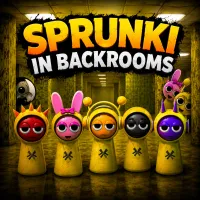
Sprunki in Backrooms
Advertisement

Friday Night Funkin vs Mami

Stunt Rider 3D
Friday Night Funkin: Rhythmic Revolution
Bad Monday Simulator

FNF Verity
![Play [VERITY!]Scroll the Gnome! Now!](/cache/data/image/game/verity-scroll-the-gnome/verity-scroll-the-gnome-m200x200.webp)
[VERITY!]Scroll the Gnome!

FNF Aura Funkin': at South America

Sprunkybox

FNF Skeleton Bros Vs Chara, Sans & Papyrus

Music Ball Hop

FNF Changed Mod

Voice Chat Online

FNF: Pluto’s Reprisal Part 1: Planets

Granny Vs Verity

FNF vs Slendytubbies Funkin Rap and Death

Granny Horror 3

Sonic.EXE: Mania!

Meme Songs-Brainrot, Brawl,99 Nights,Sprunki, FNAF
Face the unknown in Sprunki in Backrooms, a 3D horror adventure that combines maze exploration, item collection, and tense survival. Trapped inside the endless Backrooms, your objective is to recover 15 rolls of duct tape while searching for the only exit. Every corridor looks familiar, making navigation just as challenging as escaping the mysterious labyrinth itself.
Escape The Endless Maze
Search Every Corridor For Hidden Clues
Sprunki in Backrooms begins inside the iconic yellow halls of the Backrooms, where every room could hide a useful item or another confusing dead end. Explore carefully, interact with objects, and collect all 15 rolls of duct tape scattered throughout the map before the exit becomes available. The inventory helps you monitor your progress, while jumping, crouching, and running allow you to overcome obstacles and investigate every corner. Success depends on careful observation rather than speed alone.
Survival Features
- Massive Backrooms Maze: Explore interconnected corridors filled with twists and hidden paths.
- Collectible Objective: Recover all 15 rolls of duct tape to unlock your escape.
- Interactive Environment: Search objects and use clues to progress through the maze.
- Inventory System: Keep track of collected items during your adventure.
- 3D Horror Atmosphere: Dim lighting and repeating hallways create constant uncertainty.
Why Navigation Becomes The Real Challenge
Many hallways share nearly identical layouts, making it easy to revisit the same locations without realizing it. Remembering landmarks, checking unexplored paths, and avoiding unnecessary sprints become valuable habits as you explore. The combination of limited visual variety and hidden collectibles creates steady psychological tension, encouraging players to stay alert from the first hallway to the final exit.
Controls
PC
- WASD / Arrow Keys: Move
- Space: Jump
- Shift: Run
- C: Crouch
- E: Interact
- I: Open inventory
- Tab: Open menu
- Right Mouse Button: Zoom camera
Mobile
- Joystick: Move
- Jump Button: Jump
- Run Button: Sprint
- Crouch Button: Crouch
- Right Side of the Screen: Rotate camera
- Top-left Button: Open inventory
- E Button: Interact
- Top-right Button: Open menu