

Go to New Games


Happy Tree Sprunkis
Happy Tree Sprunkis
Advertisement

FNF Bikini Horrors V3

FNF Verity MAXMOD

FNF: Zipperbomb
Bubble Game 3

FNF BERGABASH

FNF VS Fliqpy – Post Traumatic
FNF: Backrooms Oneshot

Fruit Match

FNF: Hyp Mix

Virtuoso: Virtual Piano

FNF: feat. Bad Bunny PICO MIX

Wacky Walk

FNF Entity vs Solazar, Agoti, Nikusa & Aldryx

Block Runner: Subway Escape

FNF: Miku Sing Don’t Forget to Monitor (Best Friend Remix)

Backrooms Craft

FNF Serious But Everyone Sings It

Ant Flow
Cartoon Beats With A Dark Mode Twist
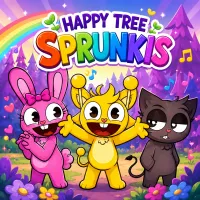
Open Happy Tree Sprunkis and the forest stage feels like a playful cartoon concert before the sound design flips into a darker mix. This Sprunki rhythm sandbox lets players drag characters onto the lineup, build layered music, and test different sound combinations.
Cute Characters Start The Mix
The normal phase is easy to enjoy. Players choose icons, place them on characters, and hear beats, melodies, effects, or voices join the track. A simple mix often works best at the start. Add one rhythm, then one melody, then a few effects so each sound has space.
Character Sound Roles
Character / Group | Sound Role | Best Use In The Mix |
Wenda | Soft melody or vocal | Smooths out the track |
Simon | Strong vocal or effect | Adds a clear highlight |
Oren & Raddy | Beatbox rhythm | Builds the groove |
Mr. Black | Heavy bass or darker effect | Changes the mood |
Fun Bot / Mr. Sun | Colorful effects | Keeps the mix playful |
New Animal Variants | Extra layers | Adds surprise variety |
Dark Mode Changes The Stage
Dark mode changes the background, character states, and sound layers. Cheerful parts can shift into heavier bass, glitch effects, or tense audio patterns. The same character lineup may feel completely different after the switch, which makes experimentation more rewarding.
Tips For A Better Mix
Start with a clean beat, then add sounds slowly. Use solo or mute to hear hidden details. Build a cheerful section first, then activate dark mode for stronger contrast. The main goal in Happy Tree Sprunkis is to create a catchy mix with a memorable phase change.